Forums
New posts
Search forums
What's new
New posts
New media
New media comments
New profile posts
Latest activity
Media
New media
New comments
Search media
Members
Current visitors
New profile posts
Search profile posts
Log in
Register
What's new
Search
Search
Search titles only
By:
New posts
Search forums
Menu
Log in
Register
Install the app
Install
Forums
Multimedia & Entertainment
Members Rides
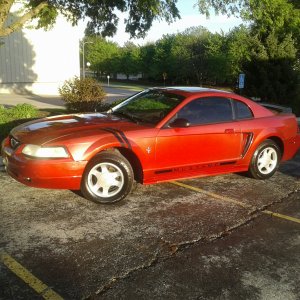
Los Angeles - Blue Sky & a Red Mustang
JavaScript is disabled. For a better experience, please enable JavaScript in your browser before proceeding.
You are using an out of date browser. It may not display this or other websites correctly.
You should upgrade or use an
alternative browser
.
Reply to thread
Message
<blockquote data-quote="Hellion94" data-source="post: 273289" data-attributes="member: 8471"><p>It's good to take a look at the picture after you take it, and just try different crops in PS until you get one that really pops out at you. Little things like the pothole are easy to miss until you start messing around with the pics. </p><p></p><p>The color stuff I did for that picture was this:</p><p></p><p>1. Increase saturation by 10 on entire picture</p><p>2. Went to Image > Adjustments > Color Balance with values like this from left to right, -6, -12, +6</p><p>3. Selected just the body of the car with the polygon lasso and made it a separate layer</p><p>4. Went to Image > Adjustments > Hue and Saturation, and did +6 on the Hue and +12 on the Saturation. </p><p></p><p>Make sure to remove the headlights and fog lights from the new layer, so their color isn't adjusted. </p><p></p><p>Hope that all helps.</p></blockquote><p></p>
[QUOTE="Hellion94, post: 273289, member: 8471"] It's good to take a look at the picture after you take it, and just try different crops in PS until you get one that really pops out at you. Little things like the pothole are easy to miss until you start messing around with the pics. The color stuff I did for that picture was this: 1. Increase saturation by 10 on entire picture 2. Went to Image > Adjustments > Color Balance with values like this from left to right, -6, -12, +6 3. Selected just the body of the car with the polygon lasso and made it a separate layer 4. Went to Image > Adjustments > Hue and Saturation, and did +6 on the Hue and +12 on the Saturation. Make sure to remove the headlights and fog lights from the new layer, so their color isn't adjusted. Hope that all helps. [/QUOTE]
Insert quotes…
Verification
Post reply
Random media
Latest posts
Hci or vortech or any other ideas
Latest: ttocs
Today at 7:43 AM
94-95 5.0 - Specific
"BlackJack, Nat Loves Dream", my 1999 GT
Latest: 07GtS197
Today at 7:05 AM
Build Ups & Projects
96blak54 2001 Cobra
Latest: white95
Today at 12:22 AM
Build Ups & Projects
New Member 2002 Roush 2 from West Texas
Latest: SsgDoc94
Yesterday at 7:44 PM
New Member Introductions
2001 Cobra clutch recommendation?
Latest: 96blak54
Yesterday at 5:39 PM
96-04 - 4V Specific
Share this page
Reddit
Pinterest
Tumblr
WhatsApp
Email
Share
Link
Forum statistics
Threads
78,554
Messages
1,536,117
Members
16,199
Latest member
Dws 95 mustang GT
Members online
lilrifraf666
ju015dd
ttocs
chasingomas
Forums
Multimedia & Entertainment
Members Rides
Los Angeles - Blue Sky & a Red Mustang
Top