
can anyone throw a Black T1 on this?

MustangChris

Mythic Level
Joined
Aug 20, 2008
Messages
27,282
Reaction score
951
Location
Aurora, CO
well, i am getting a new hood (96 cobra, black)
and ill need new wheels after the motor swap.
so here's what i envision:

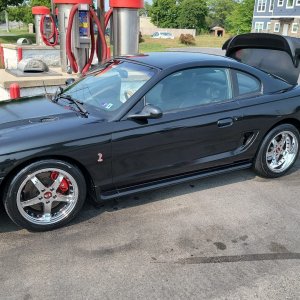
1996 E9 Laser Red
Black stripe down center of cobra hood.
black top
black out tint
paint matched mirors ("conection housing" will be gloss black, so only the folding part will be E9 laser red)
black rockers
black stock spoiler
black chrome FR500s, DD out back. 18s up front 19s out back? maybe?
export tail lights.
gloss black bezzles around tail lights
V6 badging.

special thanks to "Vlad" for the pics of his black-top mustang taht he posted.

<img src="http://carphotos.cardomain.com/ride_images/2/4359/1841/23395920227_large.jpg">

 
OP
OP
MustangChris

MustangChris

Mythic Level
Joined
Aug 20, 2008
Messages
27,282
Reaction score
951
Location
Aurora, CO
Re: Opinions Wanted: new style

lol. thanks... im at work, so its hard to take time...

and chagning body pannels from red to black (or vise-versa on the mirrors) is friggen hard! any pointers on PS would help too! :)
 

Hellion94

Well-Known Member
Joined
Jun 14, 2006
Messages
1,400
Reaction score
8
Re: Opinions Wanted: new style

MustangChris said:
lol. thanks... im at work, so its hard to take time...

and chagning body pannels from red to black (or vise-versa on the mirrors) is friggen hard! any pointers on PS would help too! :)

Changing most colors that are lighter to black is going to be hard, and usually they don't come out too convincing. The best way to do it is to select the area, copy and paste it into a new layer, then go to Image>Adjustments>Hue/Saturation and drop the saturation down about 85-90 %, but not all the way. Then drop down the lightness some, like 20% or so. The go to Image>Adjustments>Brightness/Contrast and mess with those until it looks ok. Keep in mind though that real-to-life black isn't as dark as you would think, so don't go overboard.

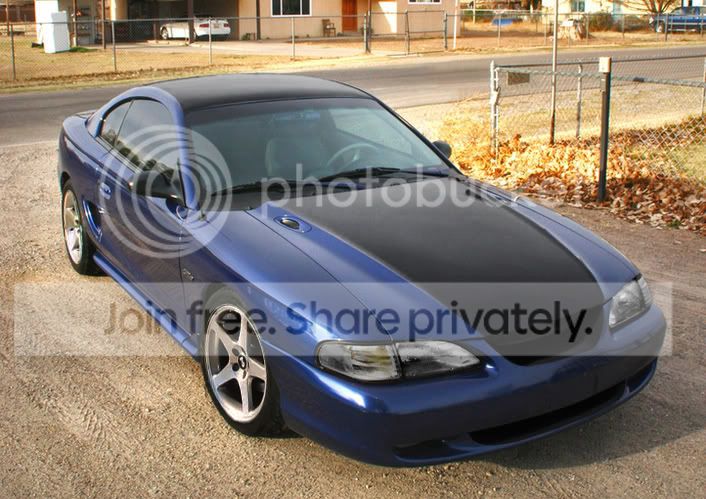
Me and you have similar tastes though, haha. Here's a 'chop I did a while back of the same sort of scheme on my car.

BlueChop-1.jpg
 
OP
OP
MustangChris

MustangChris

Mythic Level
Joined
Aug 20, 2008
Messages
27,282
Reaction score
951
Location
Aurora, CO
Re: Opinions Wanted: new style

Thanks Hellion, Ill give that a shot. thats how i did that one, but i did a color burn and did all sorts of wacky stuff.
 

switch96

Well-Known Member
Joined
Jan 11, 2009
Messages
2,165
Reaction score
0
Re: Opinions Wanted: new style

A good way I've found to make things black is to create a new layer. Desaturate that layer and use the contrast to get the hue right. Another way to make it black is to use a filter such as "Neon Glow" with the color as black. When this layer looks decent, move it under the regular layer. Then erase on the original layer what you want to be black. You can also play with contrast and such of the black region at this point. That's the method I used to change these wheels from chrome to black:

blackfr.jpg
 
OP
OP
MustangChris

MustangChris

Mythic Level
Joined
Aug 20, 2008
Messages
27,282
Reaction score
951
Location
Aurora, CO
Re: Opinions Wanted: new style

well the problem is the cobra hood has alot of texture (as you know. lol) changing it to black makes the scoops and the bump hard to see...

Venmuss, can you post some step byy step instructions? ive only had PS for a little while, and I only have it on my desktop at work... :-( lol. so im new to the menus, and functions, and options.


wm23n1 said:
brad94GT said:
i say keep the rockers and wing red
Agree

yea? i fell the hood/roof will make it look like half a mo-hawk if i dont do the wing too. lol. as for the rockers, i think ill get better PS skills before i make a final choice.
 

JonBeast

Legend
Joined
Jul 19, 2006
Messages
6,275
Reaction score
143
Location
Boston
Hellion94 said:
MustangChris said:
lol. thanks... im at work, so its hard to take time...

and chagning body pannels from red to black (or vise-versa on the mirrors) is friggen hard! any pointers on PS would help too! :)

Changing most colors that are lighter to black is going to be hard, and usually they don't come out too convincing. The best way to do it is to select the area, copy and paste it into a new layer, then go to Image>Adjustments>Hue/Saturation and drop the saturation down about 85-90 %, but not all the way. Then drop down the lightness some, like 20% or so. The go to Image>Adjustments>Brightness/Contrast and mess with those until it looks ok. Keep in mind though that real-to-life black isn't as dark as you would think, so don't go overboard.

Me and you have similar tastes though, haha. Here's a 'chop I did a while back of the same sort of scheme on my car.

BlueChop-1.jpg
I've had the same idea for a while...If I had a coupe, I would absolutely have the roof black.
 

Latest posts

Forum statistics

Threads
78,527
Messages
1,535,648
Members
16,185
Latest member
dmen76

Members online

Top